
Android 测试设备
用于真机检查不同屏幕尺寸、系统版本、深色模式、无障碍和平台交互。优先选择可解锁、仍能获得系统更新的机型。
查看 Android 测试设备推广链接 · Amazon.com 美国站模拟器足以完成初次体验;准备开始真机调试时,再考虑 Android 测试设备和具备数据传输能力的 USB-C 配件。
推广链接说明:以下链接为 Amazon Associates 联盟链接。通过链接完成符合条件的购买后,本站可能获得佣金,你的购买价格不会因此增加。
用于真机检查不同屏幕尺寸、系统版本、深色模式、无障碍和平台交互。优先选择可解锁、仍能获得系统更新的机型。
查看 Android 测试设备推广链接 · Amazon.com 美国站连接 Android 真机、外接显示器与调试配件。选购时注意数据传输规格、供电能力和端口组合。
查看 USB-C 扩展设备推广链接 · Amazon.com 美国站As an Amazon Associate I earn from qualifying purchases.
安装 Xcode ↗
安装 Homebrew ↗
Homebrew 设置完成后,在终端中运行以下命令安装 Skip:
brew install skip该命令会下载并安装 skip 工具本身,以及构建和运行 Android 版应用所必需的 Android SDK 与 gradle 构建工具。
运行以下命令,检查基础开发环境是否满足要求:
skip checkup[✓] Skip version 1.7.0 (= 1.7.0)[✓] macOS version 15.7.2 (> 13.5.0)[✓] macOS architecture: ARM[✓] Swift version 6.2.3 (> 5.9.0)[✓] Swiftly version 1.0.1 (> 1.0.0)[✓] Xcode version 26.2 (> 15.0.0)[✓] Xcode tools SDKs: 5[✓] Homebrew version 5.0.9 (> 4.1.0)[✓] Gradle version 9.2.1 (> 8.6.0)[✓] Java version 25.0.1 (> 17.0.0)[✓] Android Debug Bridge version 1.0.41 (> 1.0.40)[✓] Resolve dependencies (10.43s)[✓] Build hello-skip (56.08s)[✓] Test Swift (15.43s)[✓] Test Kotlin (26.19s)[✓] Check project schemes (5.65s)[✓] Archive iOS ipa (13.13s)[✓] Assemble HelloSkip-debug.ipa 175 KB[✓] Verifying HelloSkip-debug.ipa: 175 KB[✓] Assembling Android apk (61.1s)[✓] Verify HelloSkip-debug.apk: 80 MB[✓] Check Skip Updates: 1.7.0[✓] Skip checkup succeeded in 190.21s如果安装或检查失败,可以使用 skip checkup --verbose 重试并查看更详细的信息。也可以在常见问题 中查找常用解决方案,或前往 Slack 和讨论论坛 ↗ 向社区求助。
使用以下命令创建新的 Skip 应用项目:
skip create命令行会通过一系列问题引导你设置要创建的应用。其中最关键的两个选择是:
如果你刚接触 Skip,建议先从 App 项目开始。下面演示如何创建 hello-skip/HelloSkip 项目(生成的项目与最精简的 Skip Fuse 示例应用 ↗ 或 Skip Lite 示例应用 ↗ 一致):
$ skip create
Welcome to Skip!
Select type of project to create:  1: App: mobile application for Android and iOS  2: Library: library project with one or more modulesEnter selection (default: App) [1..2] 1
Select the mode of the project:  1: Skip Fuse: natively compiled project  2: Skip Lite: transpiled projectEnter selection [1..2] 1
Enter the project-name for the App: hello-skip
Enter the CamelCase name of the App module: HelloSkip
Optionally enter additional module names:
Enter the app bundle identifier: com.example.HelloSkip
Create a free open-source project? (y/n) [n]: nInitialize git repository for the project? (y/n) [n]: nInitialize a Fastlane configuration for the project? (y/n) [y]: yPre-build the project? (y/n) [y]: yInstall the Swift Android SDK? (y/n) [y]: yOpen the Xcode project after initialization? (y/n) [y]: y
[✓] Install Swift Android SDK (48.4s)[✓] Resolve dependencies (12.12s)[✓] Build hello-skip (53.35s)[✓] Check project schemes (6.12s)[✓] Archive iOS ipa (17.18s)[✓] Assemble HelloSkip-debug.ipa 1 MB[✓] Verifying HelloSkip-debug.ipa: 1 MB[✓] Assembling Android apk (78.91s)[✓] Verify HelloSkip-debug.apk: 80 MB[✓] Opening Xcode project (0.10s)[✓] Skip create succeeded in 168.63s
其他方式
也可以使用无交互的 skip init 命令创建 Skip 项目,详情参阅命令行参考。
应用预构建完成并在 Xcode 中打开后,就_几乎_可以开始了。还剩一步:创建并启动 Android 模拟器。它相当于 Android 世界的 iPhone Simulator,用于本地应用开发。skip 提供了一条命令,可为当前项目快速安装并配置 Android 模拟器:
skip android emulator create [✓] Configure Android SDK Manager (1.55s) [✓] Install platform-tools (0.77s) [✓] Install emulator (0.75s) [✓] Install platforms;android-34 (0.76s) [✓] Install system-images;android-34;google_apis;arm64-v8a (0.75s) [✓] Create emulator: emulator-34-medium_phone (0.76s) [✓] Create Android emulator succeeded in 5.35s命令成功完成后,Android 模拟器即已安装。使用以下命令可启动模拟器并查看日志输出:
skip android emulator launch现在可以启动新应用了!在 Xcode 中,确认已选择“HelloSkip App” scheme 和一个模拟器目标(例如“iPhone 17”),然后运行该 scheme。
系统可能会提示你对 Skip 插件执行“Trust and Enable”。确认后,项目会同时构建并启动到 iPhone Simulator 和 Android Emulator。
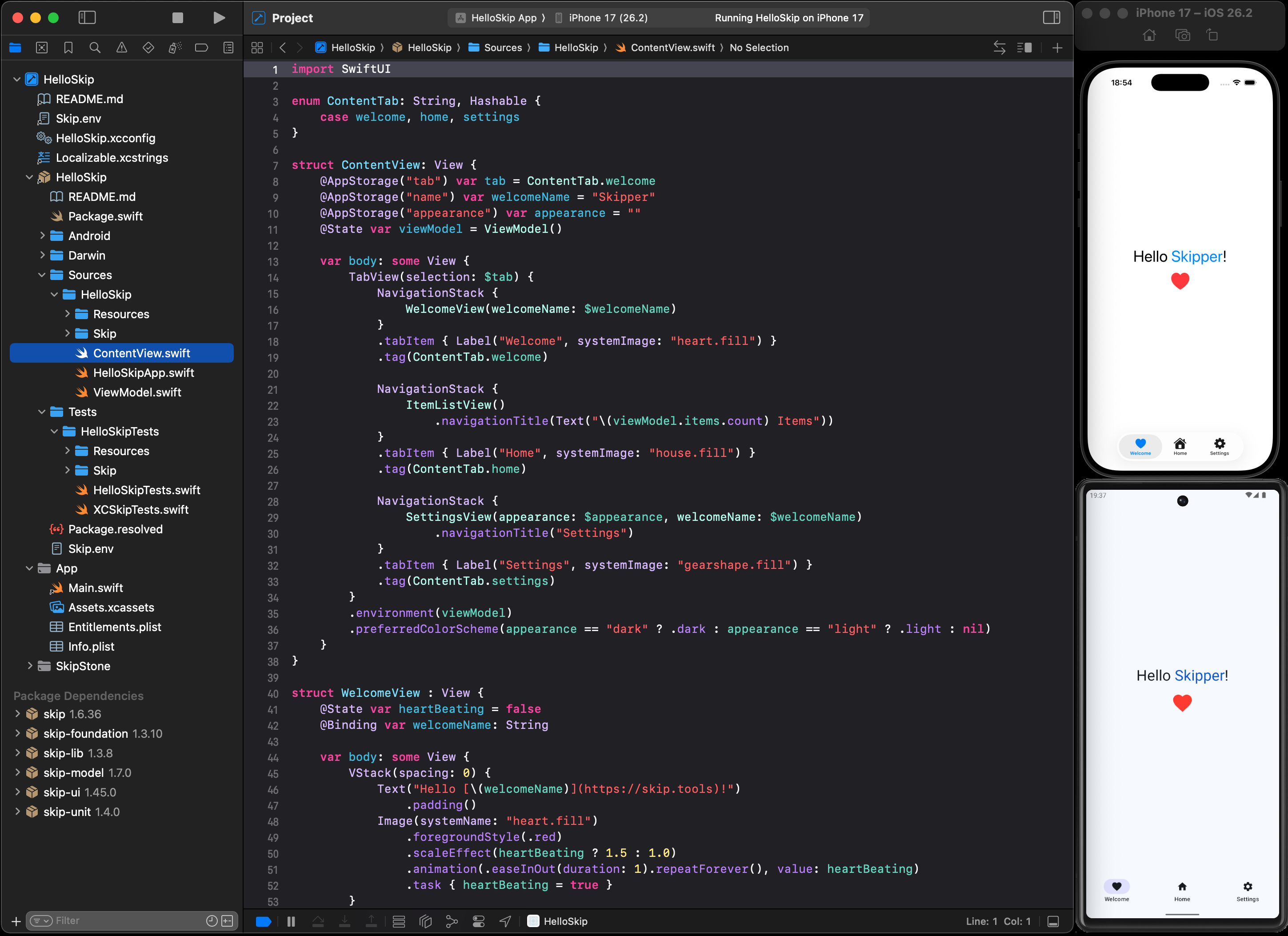
恭喜!你已经创建并启动了第一个双平台应用。现在可以尝试修改项目并重新启动,观察 Skip 如何融入你日常的“编辑—构建—运行”循环。
接下来可以:
将 skip 命令行工具更新到最新版本:
skip upgrade要让 Xcode 项目使用 Package.swift 配置允许的最新 Skip 插件和库版本,请在 Xcode 中选择 File -> Packages -> Update to Latest Package Versions。